
Dart extension methods allow developers to add utility functions and convenience getters to existing types (such as BuildContext, DateTime, String, and Widget) without subclassing or wrapping. Best practices include keeping extensions focused, null-safe, and organized into dedicated domain files.
- Use BuildContext extensions for clean access to MediaQuery, Theme, and Navigator.
- Keep extension methods pure and null-safe; avoid hiding heavy side effects inside getters.
- Group extensions by domain (e.g. context_extensions.dart, string_extensions.dart).
- Avoid name collisions by importing extensions explicitly where needed.
Flutter has taken the app development world by storm, empowering developers to craft stunning cross-platform experiences with unparalleled efficiency. However, one underrated feature often overlooked is the power of extensions—a game-changing tool that can supercharge your UI development and streamline application flow like never before.
What are Extensions?
Extensions in Flutter (introduced in Dart 2.7) are like a developer's secret weapon, allowing you to extend the functionality of existing classes with custom methods and properties. This powerful concept fosters code reusability, maintainability, and a streamlined development workflow that can elevate your projects to new heights.
Instead of creating verbose utility helper classes (like Utils.formatDate(date)), extensions let you add helper methods directly onto the class itself (like date.format()).
Mastering UI Development
In the realm of UI development, extensions can be your secret sauce for creating truly impressive and responsive user interfaces. Imagine effortlessly crafting reusable UI components with consistent styling and behavior across your app. Widget extensions, for instance, empower you to encapsulate complex logic into concise and readable code, transforming your development experience into a seamless journey.
Below is a visual example comparing the normal verbose approach vs. the clean, extension-driven approach:
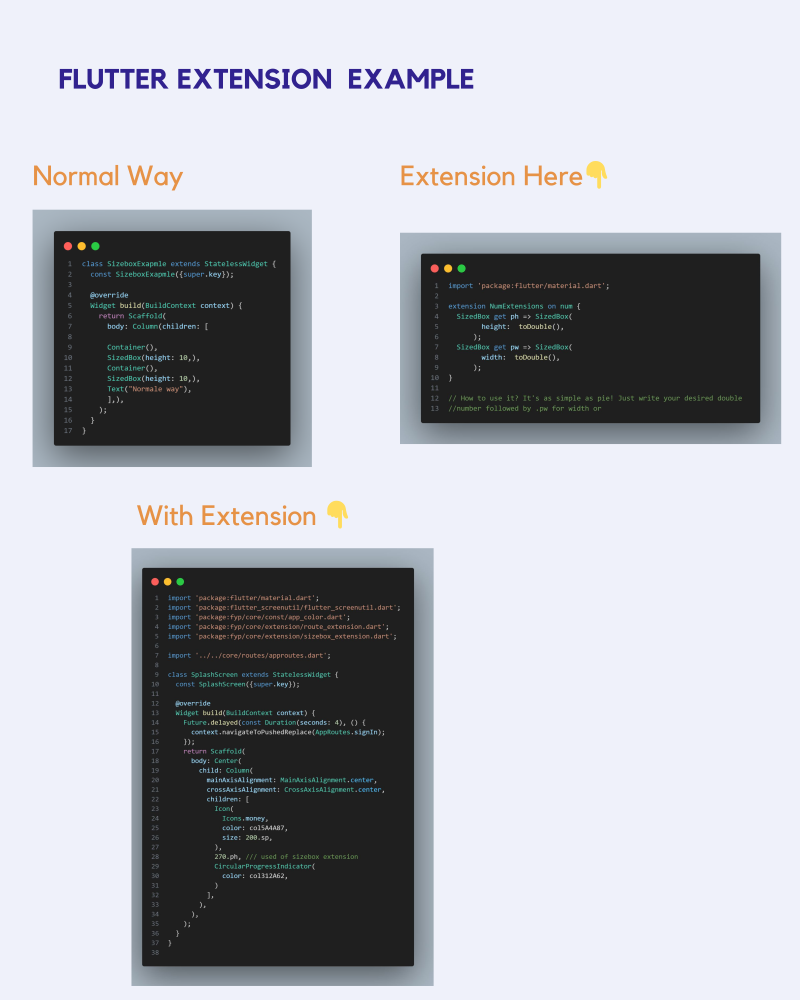
Streamlining Application Flow
But extensions in Flutter go beyond just UI development. They can also revolutionize how you manage application flow and state management. Navigating between screens becomes a breeze with elegant method calls, and integrating complex state management logic becomes a walk in the park, thanks to the power of extensions.
For example, you can write extensions on BuildContext to navigate screens easily:
extension NavigationExtension on BuildContext {
  void push(Widget screen) => Navigator.push(this, MaterialPageRoute(builder: (_) => screen));
  void pop() => Navigator.pop(this);
}
This transforms navigation to a simple context.push(DetailsScreen()), making the flow clean and intuitive.
Real-world Success
The magic of extensions isn't just theoretical; it's been proven time and again in real-world projects. Leading companies have leveraged extensions to create visually stunning shopping experiences, while fintech startups have harnessed their power to deliver robust and scalable applications with a smooth and responsive user experience.
Best Practices
While extensions are undoubtedly powerful, it's crucial to approach their usage with care and consideration. Adhering to best practices is key:
- Follow Naming Conventions: Give extensions clear, descriptive names so other developers know what classes they extend.
- Document Your Code: Document the purpose of extensions, particularly when they involve complex business logic or layout algorithms.
- Limit Scope: Avoid polluting native classes with too many domain-specific helpers. Only write extensions for reusable, general-purpose utilities.
- Proper Testing: Write unit tests for your extension methods to ensure they behave consistently across all edge cases.
Unleash the Magic
In the ever-evolving world of app development, Flutter's extensions stand as a beacon of innovation and efficiency. By harnessing their power, you can elevate your UI development and application flow to new heights, crafting truly exceptional user experiences that captivate and inspire. Why settle for ordinary when you can unleash the magic of Flutter's extensions and create applications that truly stand out?

Afaq is a mobile product engineer with 4+ years of experience shipping production Flutter applications, 120fps graphics architectures, and AI model integrations across iOS and Android.
Flutter MVP Development →
Modular Dart codebases with modern engineering conventions.
Expense Manager - Modular Clean Code Architecture →
Explore real production architecture and benchmarked results for this stack.